
Have you ever noticed WordPress strikethrough links appearing on your website?
At first glance, it can be alarming. You know you didn’t add a strikethrough to the text, and visitors may assume the content is outdated or unavailable.
In many cases, this issue is caused by a broken link monitoring plugin that has flagged the link as broken. But what happens when the link actually works perfectly fine?
The good news is that this is usually an easy fix.
[fl_builder_insert_layout id=34905]
Why Is My Link Showing a Strikethrough?
Many WordPress website owners use a plugin called Broken Link Checker to monitor their websites for broken links. This type of plugin is incredibly helpful because they can identify pages, files, or external websites that are no longer available.
Occasionally, however, a plugin may incorrectly flag a working link as broken. When this happens, the plugin may automatically display the link with a strikethrough on the front end of your website.
If you’ve tested the link and confirmed it works, you can usually mark it as “Not Broken” within the plugin settings.
How to Fix a Strikethrough Link in WordPress
Step 1: Confirm the Link Works
Before making any changes, click the link and verify that it opens correctly.
If the destination page loads properly, continue with the steps below.
Step 2: Open Broken Link Checker
From your WordPress dashboard:
- Hover over Link Checker
- Click Local [Old]
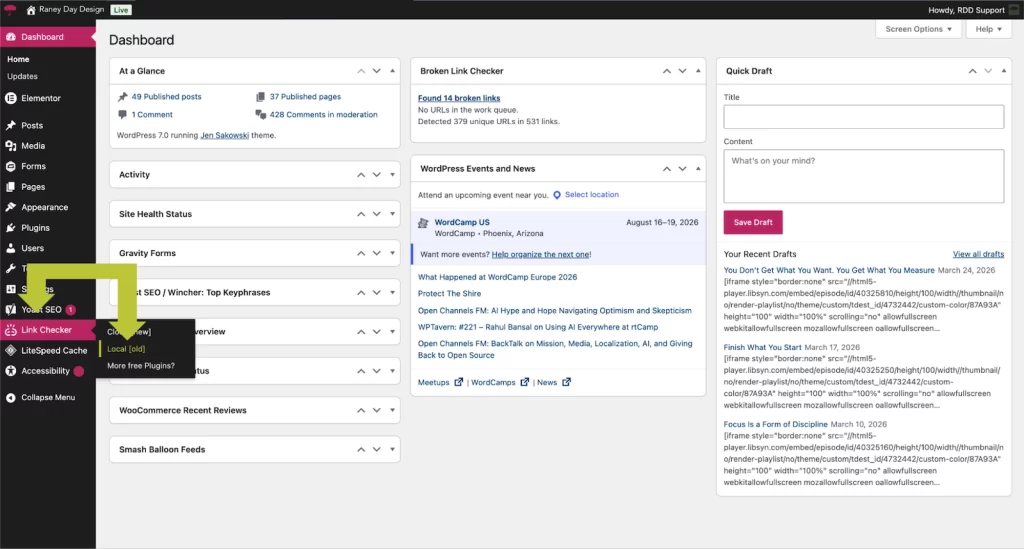
Alternatively:
- Navigate to Plugins > Installed Plugins
- Locate Broken Link Checker
- Click Cloud or Local
Step 3: Mark the Link as “Not Broken”
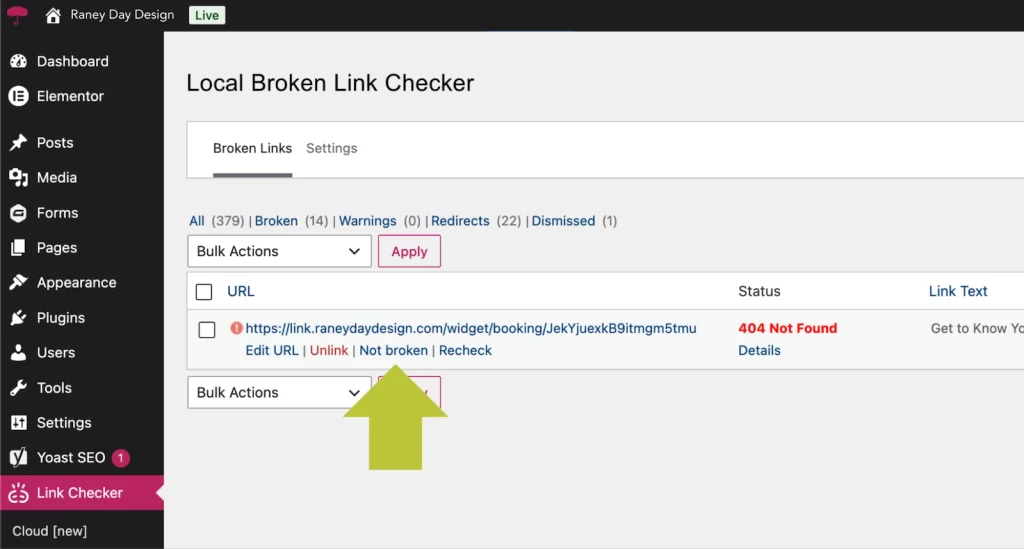
Hover over the link and select:
Not Broken
The plugin will remove it from the broken links list and stop displaying the strikethrough formatting.
Step 4: Verify the Fix
Return to the page where the issue originally appeared.
Refresh the page and confirm that the strikethrough has disappeared.
That’s it!
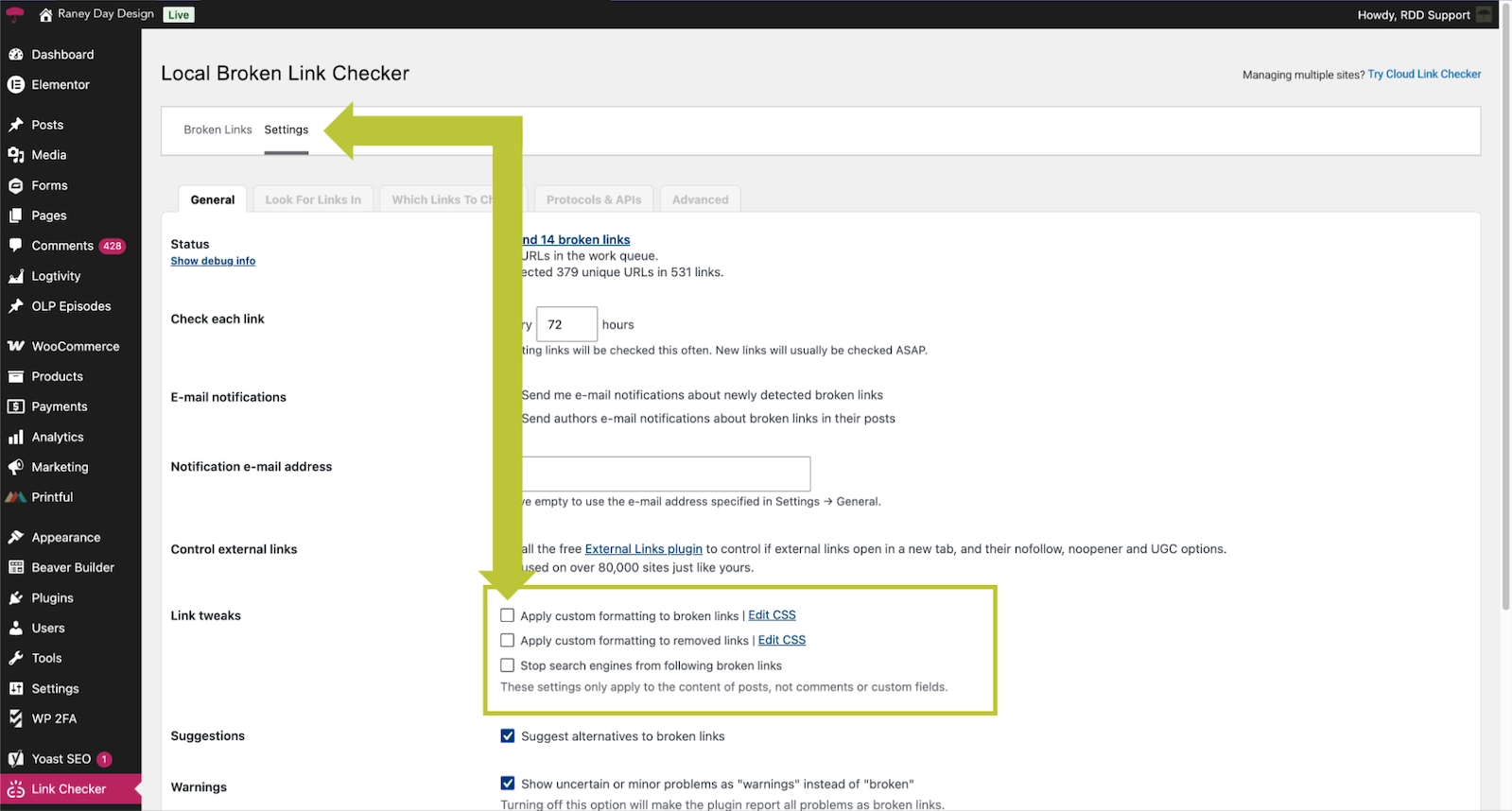
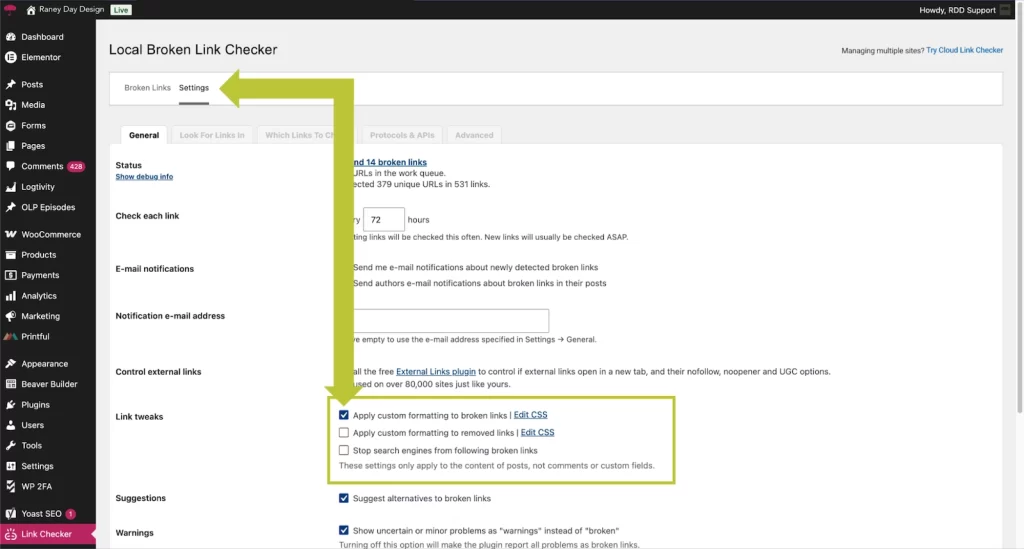
Step 5: Prevent Strikethroughs All-Together (Optional)
What If the Strikethrough Doesn’t Go Away?
If the line remains after marking the link as “Not Broken,” try the following:
- Clear your website cache
- Clear your browser cache
- Refresh your CDN cache (if applicable)
- Re-run the Broken Link Checker scan
- Check for conflicts with other plugins
Sometimes cached versions of a page continue displaying the old formatting even after the issue has been resolved.
Preventing Broken Link Issues

Broken links can negatively impact user experience and SEO. Regular website maintenance helps catch issues before visitors encounter them.
We recommend:
- Monitoring broken links regularly
- Keeping WordPress plugins updated
- Performing routine website audits
- Fixing redirects and outdated URLs promptly
A proactive maintenance plan can help keep your website running smoothly while preventing small issues from becoming larger problems.
Streamline More Than Just Your Website
If small WordPress issues like broken links, plugin conflicts, or unexpected display changes keep popping up, it might be time to think beyond one-off fixes.
Raney Day Connect is designed for business owners who want more than just maintenance—it helps streamline how your website and digital systems work together so things run more efficiently from the start.
Instead of constantly reacting to issues, you can build a setup that’s organized, connected, and easier to manage long-term.
It’s a good fit if you’re thinking:
- “I need my website and tools to actually work together”
- “I’m tired of patching problems as they come up”
- “There has to be a more streamlined way to do this”
[Explore Raney Day Connect]
Need Help Maintaining Your WordPress Website?
Keeping up with plugin updates, broken links, backups, security monitoring, and website maintenance can quickly become overwhelming.
Our WordPress Care Plans help business owners keep their websites secure, updated, and performing at their best—without the stress of managing everything themselves.
Contact Raney Day Design to learn more about our website maintenance and support services.
Frequently Asked Questions
Why are my links crossed out in WordPress?
A broken link monitoring plugin may have identified the link as broken and automatically applied a strikethrough style.
Can a working link be marked as broken?
Yes. Sometimes plugins incorrectly flag functioning links due to temporary server issues, redirects, or connection timeouts.
Does a strikethrough link hurt SEO?
The formatting itself does not hurt SEO, but actual broken links can negatively impact user experience and search engine performance.
Should I use a broken link checker plugin?
Broken link monitoring tools can be helpful, but they should be reviewed periodically to ensure links are being reported accurately.


28 thoughts on “Why WordPress Links Show a Strikethrough (And How to Fix It)”
Do you ever have this issue on a mass number of “broken” (but not broken” links? I have over 700 links that are being claimed as broken that are not and I can’t seem to figure out why.
I already have the Broken Link plugin. Some of my links have strike throughs and they are the correct URL.
I’m so grateful to you for this easy fix. Thank you!
Thanks! Helped me fix the problem right away.
Thanks for showing me how to do this! Other posts were saying to add code and I didn’t want to do that. haha. Your tutorial fixed my issue. How annoying that the plugin does that!
I’m so glad you found this helpful!!
This is SO helpful! Thank you very much 🙂
Our pleasure!!!
VERY VERY VERY Helpful and easy to follow. Thanks!!
Thank you!! We try 🙂
Thank you so much! I didn’t realize why this happened to me from time to time. You just saved me some time today! Much appreciated.
Lisa, I’m so glad that worked for you!!
thanks.
Wahoo!
It works. Thank you!
Our pleasure!
Thank you! This is just what I needed!
My site says there are no broken links yet there are strikethroughs in documents – how can that happen?
Thank you!!!! It did the trick!
You are welcome. Glad we could help!!
Very helpful!
We are glad it was helpful.
Thank you very much! Feeling epic that I fixed it myself!
Does anyone know why no-broken links show as broken?
Great post! Fixed my problem in 30 seconds 🙂
Awesome! So glad it worked for you!
Great post. I just had this exact problem and found your tip. Thanks.
Hi Chris! So glad you found it helpful! It’s so frustrating when links appear broken but aren’t, isn’t it?
Comments are closed.